Boto3でRekognition
Boto3でRekognitionのラベル検出を試します。
対象は前回も使用した、2016年の伊勢志摩サミットの写真(出典:G7伊勢志摩サミット公式ホームページ)です。
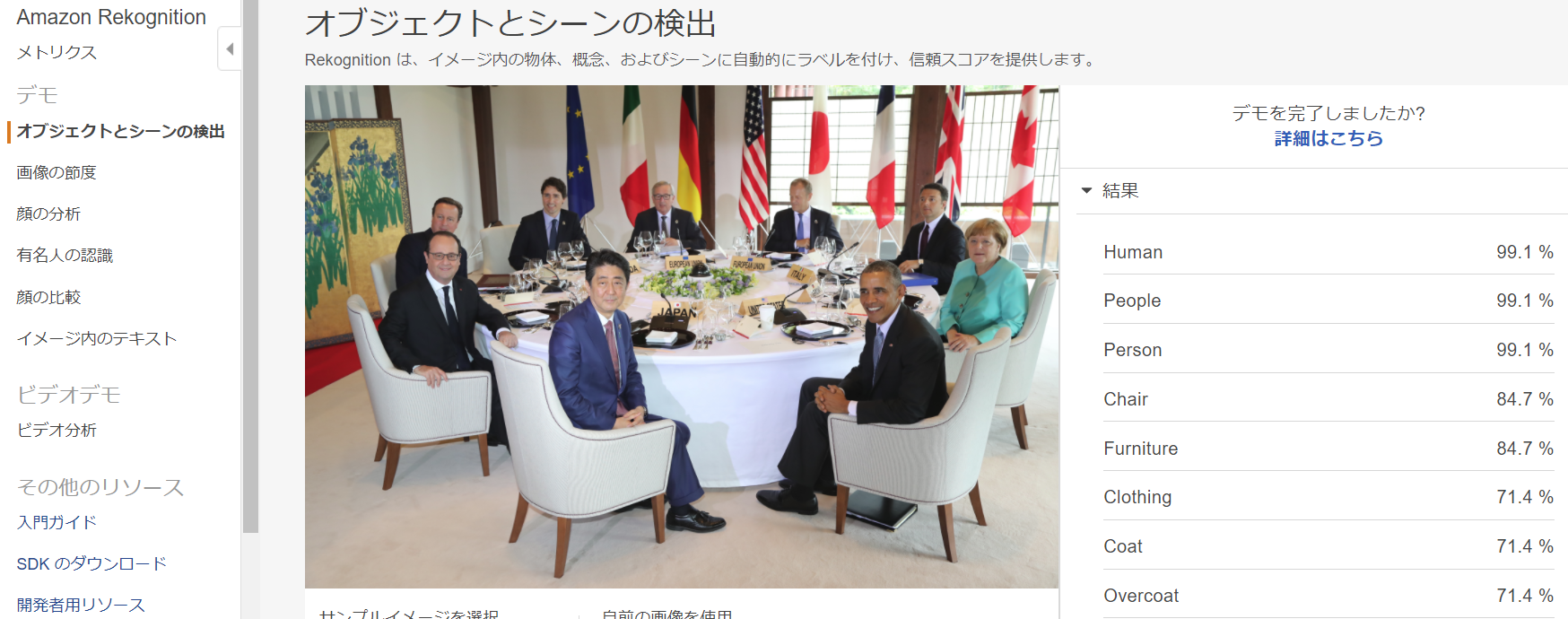
『伊勢志摩サミットの写真』はサーバとS3に事前に格納しておきます。
まずはS3上の画像をRekognitionで認識させてみます。
rekognition_s3.py
1# -*- coding: utf-8 -*-23import sys, boto345args = sys.argv67if __name__ == "__main__":8 fileName=args[2]9 bucket=args[1]1011 client=boto3.client('rekognition','us-east-1')1213 response = client.detect_labels(Image={'S3Object':{'Bucket':bucket,'Name':fileName}})1415 print('Detected labels for ' + fileName)16 for label in response['Labels']:17 print (label['Name'] + ' : ' + str(label['Confidence']))『rekognition_s3.py』の第1引数に『S3バケット名』、第2引数に『画像ファイル名』を指定して実行すると、認識結果が返ってきます。JSON形式で返ってきたものを今回は見やすく整形しています。
1$ python rekognition_s3.py your_backet_name G7_Ise-Shima_Summit.jpg2Detected labels for G7_Ise-Shima_Summit.jpg3Human : 99.14710998544People : 99.1471023565Person : 99.14710998546Chair : 84.77353668217Furniture : 84.77353668218Clothing : 71.42703247079Coat : 71.427032470710Overcoat : 71.427032470711Suit : 71.427032470712Home Decor : 71.24073791513Linen : 71.24073791514Tablecloth : 71.24073791515Indoors : 65.37948608416Reception : 65.37948608417Reception Room : 65.37948608418Room : 65.37948608419Waiting Room : 65.37948608420Dining Room : 61.963081359921Interior Design : 61.963081359922Dining Table : 60.281444549623Table : 60.281444549624Restaurant : 60.072570800825Tabletop : 58.90250778226Worker : 53.78394699127Bowl : 53.775566101128Leisure Activities : 53.326053619429Dinner : 53.199203491230Food : 53.199203491231Meal : 53.199203491232Supper : 53.199203491233Couch : 51.901603698734Head : 50.935764312735Face : 50.612373352136Portrait : 50.6123733521次にサーバ上にある画像をアップロードしてRekognitionで認識させてみます。
rekognition_ebs.py
1# -*- coding: utf-8 -*-2import sys, boto334args = sys.argv5filename = args[1]67#boto3のclient作成、rekognitionとリージョンを指定8client = boto3.client('rekognition','us-east-1')910# 画像ファイルを読み込んでバイト列を取得1112with open(filename, 'rb') as source_image:13 source_bytes = source_image.read()1415# rekognitionのdetect_labelsにバイト列を渡してラベル検出実行1617response = client.detect_labels(18 Image={19 'Bytes': source_bytes20 }21)2223# 返ってきたresponseからラベル名(Name)と確度(Confidence)を整形して出力2425for label in response['Labels']:26 print("{Name:30},{Confidence:.2f}%".format(**label))『rekognition_ebs.py』の第1引数に『画像ファイル名』を指定して実行すると、認識結果が返ってきます。JSON形式で返ってきたものを今回は見やすく整形しています。
1$ python rekognition_ebs.py G7_Ise-Shima_Summit.jpg2Human ,99.15%3People ,99.15%4Person ,99.15%5Chair ,84.77%6Furniture ,84.77%7Clothing ,71.43%8Coat ,71.43%9Overcoat ,71.43%10Suit ,71.43%11Home Decor ,71.24%12Linen ,71.24%13Tablecloth ,71.24%14Indoors ,65.38%15Reception ,65.38%16Reception Room ,65.38%17Room ,65.38%18Waiting Room ,65.38%19Dining Room ,61.96%20Interior Design ,61.96%21Dining Table ,60.28%22Table ,60.28%23Restaurant ,60.07%24Tabletop ,58.90%25Worker ,53.78%26Bowl ,53.78%27Leisure Activities ,53.33%28Dinner ,53.20%29Food ,53.20%30Meal ,53.20%31Supper ,53.20%32Couch ,51.90%33Head ,50.94%34Face ,50.61%35Portrait ,50.61%関連リンク
Amazon Rekognition の開始方法 ステップ 4: API の使用開始
https://docs.aws.amazon.com/ja_jp/rekognition/latest/dg/get-started-exercise.html
AWS SDK for Python (Boto3)
https://aws.amazon.com/jp/sdk-for-python/
Amazon Rekognitionで画像ファイルのラベル検出(Python boto3で)
https://qiita.com/oyngtmhr/items/40addedffc9b32f377fa
おわりに
以上、EC2インスタンスからAWS SDK for Python (Boto3)でRekognitionを試してみました。
SDKを使うことで画像認識を簡単なコードで実現でき、アプリケーションへの画像認識機能の組み込みが容易に可能です。是非お試し下さい。
最後までお読み頂きありがとうございました。