本日よりHands on Labにてトレーニングを受ける事が出来ます。
基本的にre:Invent期間中にLab内での受講となりますが、サイト自体はどこからでも確認できます。
受講方法は
にログインして、受けたいコースを選びシリアルを入力する事で受けられます。
全てテキストは英語ですが、キャプチャも豊富でわかりやすくなっております。
また、Hands on LabsはAWSのアカウントが不要で、クレジットカードの登録なしで利用できる点もとてもいいです。
以下に今回利用できるコースを紹介します。
非常に充実している事がわかりますが、今後オンライントレーニングとして利用 できるのが楽しみですね!
私も期間内に出来るだけ受けたいと思います。
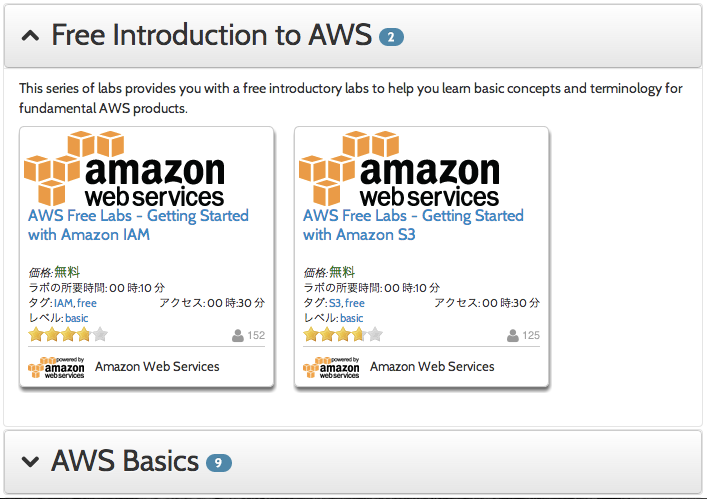
○ Free Introduction to AWS
ハンズオン入門として、以下の2つのコースが受講できます。
●AWS Free Labs – Getting Started with Amazon IAM
●AWS Free Labs – Getting Started with Amazon S3
無料体験としてIAM,S3の基本を学ぶ事が出来ます。
触ってみたい人はもちろん、営業や今後AWSを触って行くかもしれない人もやってみましょう。
○ AWS Basics
上記と同じく入門的なコースです。ここからはシリアルが必要となります。
●AWS Basics – Lab 1: Creating Amazon EC2 Instances (for Linux)
●AWS Basics – Lab 1: Creating Amazon EC2 Instances (for Windows)
●AWS Basics – Lab 2: Elastic Block Store (EBS)
●AWS Basics – Lab 3: Elastic Load Balancing
●AWS Basics – Lab 4: Auto Scaling (for Linux)
上記の4-5を受講する事で、EC2の立ち上げから基本的なオートスケールまでを学ぶ事が出来ます。
●Building Your First Virtual Private Cloud (VPC)
●Caching Static Files with Amazon CloudFront
●Introduction to AWS Elastic Beanstalk
●Launching Amazon EC2 Spot Instances
VPC,CloudFront,Beanstalk,Spot Instancesに触れる事が出来ます。
○ Implementing AWS
ここからは実践的な内容となります。
●Ad Analytics with Hive and Amazon Elastic Map Reduce
HiveとEMRを使った広告分析
●Configuring GlusterFS on AWS
AWS上でGlusterFSのスケーラブルな分散ファイルシステム構築
●Deploying an HTML5 and WebSocket Game with AWS Elastic Beanstalk and Git
BeanstalkとGitを使ったHTML5とWebソケットを使ったゲームの開発
●Exploring Google Ngrams with Amazon EMR
Google Ngram ViewerとEMRを使った書籍検索
●Hosting WordPress Using Amazon S3
WordPress + Amazon S3ホスティング
●Launching and Managing a Web Application with CloudFormation
CloudFormationを使ったWeb applicationの立ち上げ・管理
●Media Sharing Website – Part 1: Media Upload
●Media Sharing Website – Part 2: Transcoding
Elastic Transcoderを使った動画共有サイトの構築
○ Beyond AWS Basics
●Auditing Changes to Amazon EC2 Security Groups
EC2のセキュリティグループへ監査の変更
●Automating Web Application Deployments with PowerShell
パワーシェルを使ったアプリケーションのデプロイ自動化
●Bundling EBS-Backed AMIs
バンドが担保されたEBSを使ったAMI
●Creating an Amazon Virtual Private Cloud (VPC) with CloudFormation
CloudFormationを使ったVPCの構築
●Introduction to Amazon DynamoDB
●Introduction to Amazon Redshift
●Introduction to AWS OpsWorks
DynamoDB/Redshift/OpsWorksを始めよう
●Leverage the AWS Tools for PowerShell to Refactor your Windows Website
Tools for PowerShellを用いたWindows Websiteのリファクタリング
●Using Amazon RDS for Applications
アプリケーションにRDSを使おう
●Using Dynamic Registration and Dashboards for Amazon EC2 Instances
EC2インスタンスの自動登録とダッシュボード利用
●Working with Amazon CloudFront for Dynamic Content Acceleration
動的コンテンツへのCloudFront活用
●Working with CloudFormation
●Ad Analytics with Hive and Amazon Elastic Map Reduce
HiveとEMRを使った広告分析
●Configuring GlusterFS on AWS
AWS上でGlusterFSのスケーラブルな分散ファイルシステム構築
●Deploying an HTML5 and WebSocket Game with AWS Elastic Beanstalk and Git
BeanstalkとGitを使ったHTML5とWebソケットを使ったゲームの開発
●Exploring Google Ngrams with Amazon EMR
Google Ngram ViewerとEMRを使った書籍検索
●Hosting WordPress Using Amazon S3
WordPress + Amazon S3ホスティング
●Launching and Managing a Web Application with CloudFormation
CloudFormationを使ったWeb applicationの立ち上げ・管理
●Media Sharing Website – Part 1: Media Upload
●Media Sharing Website – Part 2: Transcoding
Elastic Transcoderを使った動画共有サイトの構築
○ Beyond AWS Basics
●Auditing Changes to Amazon EC2 Security Groups
EC2のセキュリティグループへ監査の変更
●Automating Web Application Deployments with PowerShell
パワーシェルを使ったアプリケーションのデプロイ自動化
●Bundling EBS-Backed AMIs
バンドが担保されたEBSを使ったAMI
●Creating an Amazon Virtual Private Cloud (VPC) with CloudFormation
CloudFormationを使ったVPCの構築
●Introduction to Amazon DynamoDB
●Introduction to Amazon Redshift
●Introduction to AWS OpsWorks
DynamoDB/Redshift/OpsWorksを始めよう
●Leverage the AWS Tools for PowerShell to Refactor your Windows Website
Tools for PowerShellを用いたWindows Websiteのリファクタリング
●Using Amazon RDS for Applications
アプリケーションにRDSを使おう
●Using Dynamic Registration and Dashboards for Amazon EC2 Instances
EC2インスタンスの自動登録とダッシュボード利用
●Working with Amazon CloudFront for Dynamic Content Acceleration
動的コンテンツへのCloudFront活用
●Working with CloudFormation
CloudFormation活用